
Land conversion from agricultural to non-agricultural use is mandatory in Odisha if you want to use farmland for purposes like house construction, commercial buildings, shops, industries, schools, hospitals, or other non-farming activities. The Odisha Government has made this process fully online through the Revenue Services portal.
This article explains the complete step-by-step procedure, fees, payment method, status tracking, and approval process.
What is Agricultural Land Conversion?
Agricultural land conversion means changing the legal use of land from farming (agriculture) to non-agricultural purposes. As per the Odisha Land Reforms (OLR) Act, Section 8(A), prior approval from the Tahasildar is compulsory.
❗ Without conversion approval, construction on agricultural land is illegal and may attract penalties.
Official Website for Application
👉 Odisha Revenue Services Portal
🔗 https://odisharevenueservices.nic.in
Step-by-Step Procedure to Apply Online
Step 1: Visit the Official Website
Open your browser and go to:
👉 https://odisharevenueservices.nic.in
Step 2: Click on “Land Record Services”
On the homepage, find and click the “Land Record Services” option.
Step 3: Open Revenue Services Portal
Click on the link “odisharevenueservices.nic.in” shown under Land Record Services.
Step 4: Select Land Conversion Option
Click on:
“Apply for Conversion of Agriculture Land U/s 8(A) of OLR Act”
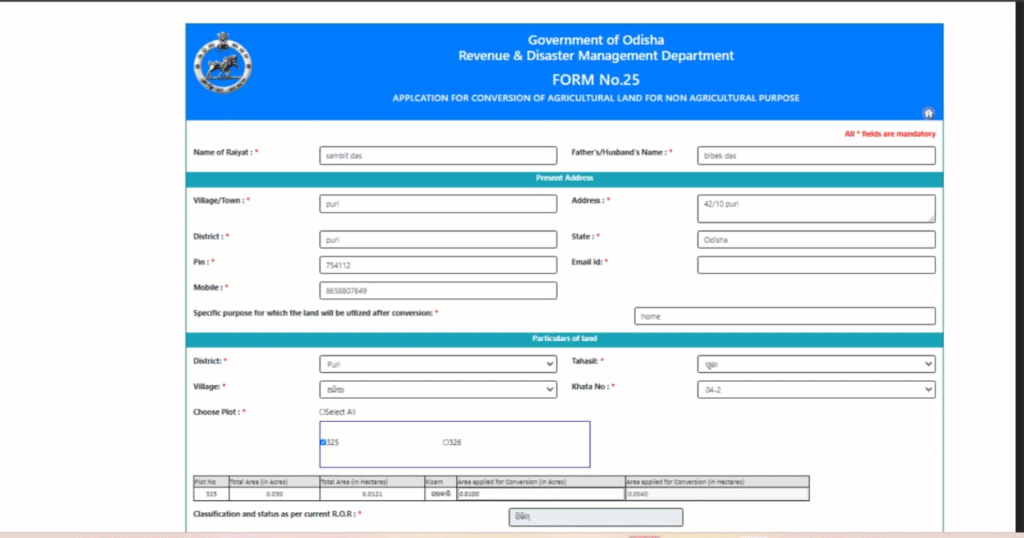
Step 5: Enter Applicant Details
Fill in all required applicant information carefully:
- Applicant Name
- Father’s / Husband’s Name
- Full Address
- Correct PIN Code
- Valid Mobile Number
📱 Important: All updates and alerts will be sent via SMS to the registered mobile number.
Step 6: Enter Land Details
Now provide complete land information:
- Tahasil Name
- Village Name
- Khata Number
- Plot Number
- Area/Extent of Land
⚠️ Ensure details exactly match Record of Rights (RoR).
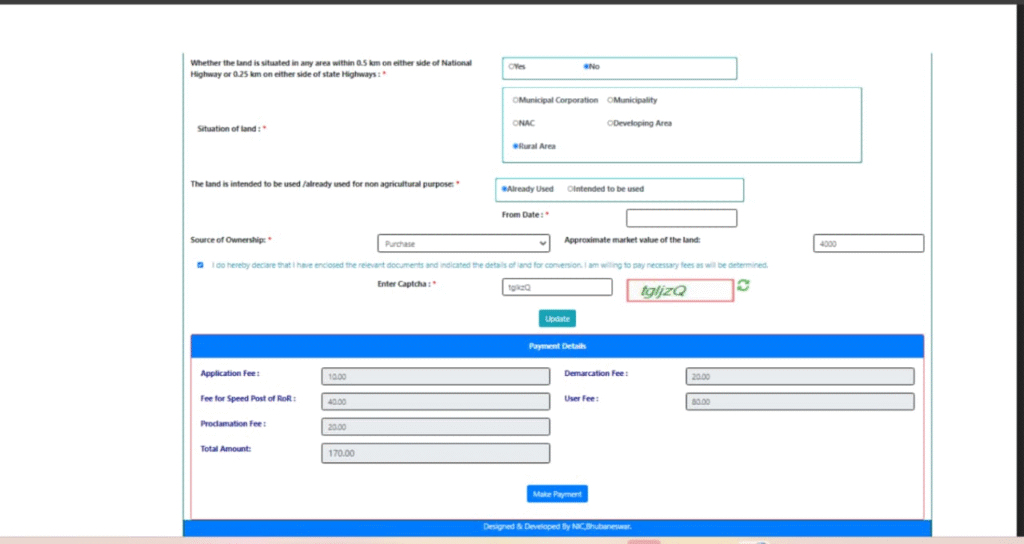
Step 7: Provide Purpose & Usage Details
You must clearly mention:
- Location of the land
- Date from which land is already used or intended to be used for non-agricultural purpose
- Intended non-agricultural use (residential, commercial, industrial, etc.)
Step 8: Submit the Application
After verifying all details, click on Submit.
Step 9: Note Your Application Number
Once submitted successfully, the system generates an Application Number.
📌 Very Important:
Save this number for:
- Payment
- Status tracking
- Communication with Tahasil office
Fee Payment Process
Step 10: Pay the Prescribed Fee
After submission, proceed to fee payment.
Step 11: Available Payment Options
You can pay using:
- Net Banking
- Debit Card
- Credit Card
Step 12: Make Payment via Treasury Portal
- Click on “Make Payment”
- You will be redirected to Odisha Treasury Portal
- Follow on-screen instructions
- Complete the transaction
✅ After successful payment, download the Acknowledgement-cum-Payment Receipt
If Payment is Deducted but Receipt Not Generated
- Do not panic
- Check payment status on the portal
- Use your Transaction ID
- Generate receipt again using Transaction ID
Application Processing & Status Tracking
Step 13: Verification by Tahasildar
- Your application becomes visible to the respective Tahasildar
- Documents are verified
- You receive SMS notification once the case is instituted
Step 14: Track Case Status Online
You can track your application status through:
👉 DWIST Portal
🔗 http://dwistodisha.nic.in
Use:
- Application Number
- Relevant details as asked
Step 15: Approval & Conversion Fee Payment
- You will receive SMS notification when application is approved
- Log in again at:
👉 https://odisharevenueservices.nic.in - Check application status
- Deposit the Conversion Fee as directed
Final Approval
Once conversion fee is paid and approved:
- Land officially becomes Non-Agricultural Land
- You can legally:
- Construct buildings
- Apply for building plan approval
- Use land for commercial or residential purposes
Important Points to Remember
- Conversion is mandatory before construction
- Ensure land is free from disputes
- Enter details strictly as per RoR
- Keep:
- Application Number
- Transaction ID
- Payment Receipt safely
Who Can Apply?
- Landowners
- Legal heirs
- Power of Attorney holders (as per rules)
Conclusion
The Odisha Government’s online land conversion system has made the process transparent, faster, and citizen-friendly. By following the above steps carefully, applicants can convert agricultural land for non-agricultural use without visiting Tahasil offices repeatedly.
For timely approval, always provide accurate details, make payments correctly, and regularly track application status.